|
Mind's Eye Visual Business 98
Visual Business 98 is more than just an Accounting
Software application, it's a Sales Tool for your
business. If you want to track Sales in your business from Start
to Finish, then this tool will help you accomplish that more than other
simple accounting applications. You can start out by generating a Sales Quote
for your customer and then convert that Sales Quote into a Sales
Order that automatically flags required Inventory Items.
Once you have received all of your Inventory Items you can then
conver the Sales Order into a Sales Invoice.
Not only do we make it easy to generate Sales Quotes for you
customer we make it easy to make deposits on those Sales Orders
as well.
Visual
Business 98 Software Highlights
Download An Evaluation Copy
Now! (9.5MB) |
| Multi-User
Network Ready |
Easy To
Use! |
| Multi-Window
Support |
Drag and
Drop Data Entry |
| On Line
Help |
Search
Nearly Any Field |
| Visual
Business 98 Software Modules |
Sales
Order Module |
 |
Generate
Sales Quotes, Sales Orders and Sales Invoices
|
|
|
Convert
Quotes to Orders and then Orders to Invoices.
|
|
|
Receive
advance payments on Sales Orders to customer accounts.
|
|
|
Accept
multiple forms of payment for a single Sales Invoice.
|
|
|
Enter
and print comments/notes on Sales Quotes/Orders/Invoices for each line item or the entire
transaction.
|
|
|
Enter
services as well as inventory items into sales transactions.
|
|
|
Enter
separate Bill To and Ship To addresses on sales transactions.
|
|
 more info... |
| Accounts Payable
Module |
|
|
Track
Vendor purchases.
|
|
|
Automatically
distribute A/P Invoices on up to 5 G/L Accounts.
|
|
|
Apply
check payments over multiple invoices.
|
|
|
Generate
A/P Aging reports.
|
|
|
Pay
from multiple checking accounts.
|
|
 more info... |
| General Ledger Module |
The General Ledger Module is were you
create your company's Chart of Accounts, enter General Ledger Transactions and post all of
the outer modules to your Chart of Accounts. Before any G/L Transactions can be entered
you must create your Chart of Accounts using the General Ledger Chart of Accounts
Maintenance Form. |
 more info... |
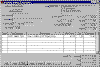
| Inventory Control |
The Inventory Control is used to make
adjustments to your inventory amounts for products. |
 more info... |
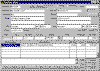
| Purchase Orders |
The Purchase Order Module is used to place
Purchase Orders for products from your vendors. Then once product has been shipped to your
location you can receive the products into inventory. Individual Purchase Receipts are
recorded each time you post a Purchase Receipt. |
 more info... |
Visual Business 98 is designed to work the way you and your business really work! Why
put up with only being able to do one quote or order at a time or work with one customer
at a time. You can open multiple windows within Visual Business simultaneously. For over
15 years, our goal has been to deliver the best software possible and make it easier for
you to run your business. We continually tweak and improve it every day. We listen to our
customers and watch how they do business. We try to reduce those repetitive tasks and
redundant data entries. Why not let the software do most of the work for you. Computers
are supposed to give us more free time by doing most of the work for us. Well that's what
we want to do for you. Our software helps you get more work done in less time. Download it
now and try it out and see why everyone just says, "Wow!".
Pricing Information
Key Benefits
 |
Simple To
Install And Easy To Use
You've probably heard this before! But you won't know until you try it out. So we
have a way for you to try it out before you buy it. Simply download from our web site and
try it. It's so simple to install you won't believe it. All you need to download is one
file. Once you download it to your drive, just double click on the file to install it and
follow the prompts. Then you can completely try it out and see just how easy it is to use.
|
|
|
Multi-User
Network Ready
Visual Business is Network Ready and isn't stingy! It shares data like no other software
package has dared to share before. Multiple users can be working with the same customer or
vendor simultaneously! Just imagine being able to have one user invoicing a customer,
while another user is entering an order for that same customer, while yet another user is
receiving a payment for open invoices for that customer all at the same time and keeping
the customer's balances updated real time!
|
|
|
Multi Window
Support
You can open multiple windows within Visual Business simultaneously. Imagine your normal
work day when you are trying to get a quote done for a client and another client calls and
wants information on their last order or wants to find out a price or availability on some
product you sell. Well in most accounting applications you would have to quit working on
your Quote you were working on and bring up the client's information and then close that
window to bring up the product file to find the product they are looking for. STOP working
that way and try using Visual Business to see how you can help improve your productivity
by working on several things at the same time, even if you do get interrupted. Simply open
another customer form right on your screen and find the customer's information without
closing your Quote. Now that you have your customer's information on the screen, they want
a quote too. Well, simply right click over the customer window and select New -> Quote
from the popup menu. A new Quote for that customer will launch ready for you to enter in
product or service information. How easy can it get? Well that's our goal is to make it
very easy and very efficient.
|
|
|
Reduce Carpal
Tunnel Syndrome with Drag and Drop Automated Data Fills
Visual Business Automatically Fills in data for you using Drag and Drop. For example you
can drag a Customer Code onto a Quote, Order or an Invoice and have all of the customer
information automatically filled in for you! Drag and drop part numbers onto Invoices and
Purchase Orders! Wow! This is accounting software? Hey we don't invent the concepts we
just put them to good use. Visual Business should help reduce carpal tunnel syndrome.
|
|
|
Take Your Right
Mouse Button Off Unemployment!
Have you ever wondered why your software never uses that second mouse button? Well
we get annoyed when it doesn't and so will you after using Visual Business. You will be
spending more and more of your day trying to figure out how to look busy so they don't
eliminate your job after the huge productivity gains by using Visual Business!
|
|
|
Intuitively
Smart Data Entry
Wouldn't you like your software to be intelligent? Think ahead and do some of your work
for you? Like maybe fill in most of the data for you. Well, Visual Business will
Automatically fill in a lot of the numbers for you so you don't have to. For example, if
you are entering an Accounts Payable Invoice and it's $1000. Wouldn't it be nice to have
it automatically distribute intelligently to multiple accounts? Well all you have to do is
type in the amount of the invoice and Visual Business will automatically distribute the
amount to the first account assigned to the vendor. Now change that amount and Visual
Business will automatically add another line item and distribute the remaining amount to
the next account for you. It's that simple. Visual Business helps Automate your entry and
Reduce Errors!
|
|
|
Powerful
Searching Capability
Simply type a customer's name or street name to find a customer. Search for Invoices,
Orders or Quotes by simply typing a Customer ID, Name, Company Name or Street Address into
the appropriate field and the software will find the next invoice order or quote for that
customer.
|
| Description |
Price |
| All Modules (no payroll) |
$995 |
| Additional User Licenses |
$795 |

| 